Exchange config.
Create exchange api
To use our strategies, you must have an API configured for third-party applications on one of the Kryll-compatible exchanges below. Only future/perpetual orders need to be activated, as spot and margin trading is not supported by our strategies. Please also check that the future/perpetual service is available in your country for the exchange concerned.


Save the API key and secret key, it will be used to connect with Kryll.
Kryll configuration
Connect exchange api with kryll
Once you've set up your API on the exchange of your choice, you need to connect Kryll to it. All available exchanges can be connected simultaneously.
Import kryll strategies
After purchasing one of our products, you will receive a zip file containing the kryll strategies in JSON format. You need to import them into the kryll platform to be able to use them. To do this, follow these steps on the kryll website.

On the kryll website, go to the strategy editor in the left-hand menu. Then create a new strategy.

In the bottom left-hand corner of the WYSIWIG window, click on the wrench icon, then on the tag icon.

At the bottom of the page, click on Import and choose the strategy you wish to use, then click on Save.

Finally, in the top right-hand corner of the WYSIWIG window, click Save. The strategy has now been successfully imported.
You dont have to edit the strategy, it's ready to use.
Configuration of the kryll starter webhook
Now we need to set up a webhook to start a strategy in tradingview, which will be configured on a trend to send a signal to Kryll. Each strategy has its own webhook, and you can use the same webhook on several pairs. When you start a strategy in this way, you pay no fees until the strategy is launched. You have the possibility to trade in livetest mode, with mutch less fees and fake money.

On the kryll website, go to webhooks in the left-hand menu. Then create a new

Choose an imported strategy from the My Strategies drop-down menu and click Create.

You now see your strategy listed with an associated webhook, click on the clipboard icon to copy the webhook URL, save it somewhere and it will be used in tradingview to start the strategy.
You can also start a strategy manualy, read our documentation
Pay kryll fees
With kryll, there's no subscription, you pay for what you use. That's the great thing about kryll. You have to buy kryll tokens to pay the fees. You only pay fees when a strategy is running, calculated per minute. Example: For 200€ allocated to a strategy for one week, you'll pay 0.5€.


Check yout the official documentation on how to buy kryll
Tradingview config.
Import tradingview templates
When you purchase one of our products, we provide you with trend templates in a well-organized object tree for quick installation. You'll find them in a shared Tradingview chart, the link will be provided to you at the time of purchase. Just import them into your Tradingview and copy them wherever you like. Name templates are also supplied.
Setting up the tools in Tradingview takes some preparation, but when it's done, it's done once and for all and everything can be reused indefinitely. You don't need to set up everything at once, just configure what you need a little at a time and it's all done. You have a limited number of alarms with Tradingview, depending of your plan, thus you'll need to manage them.
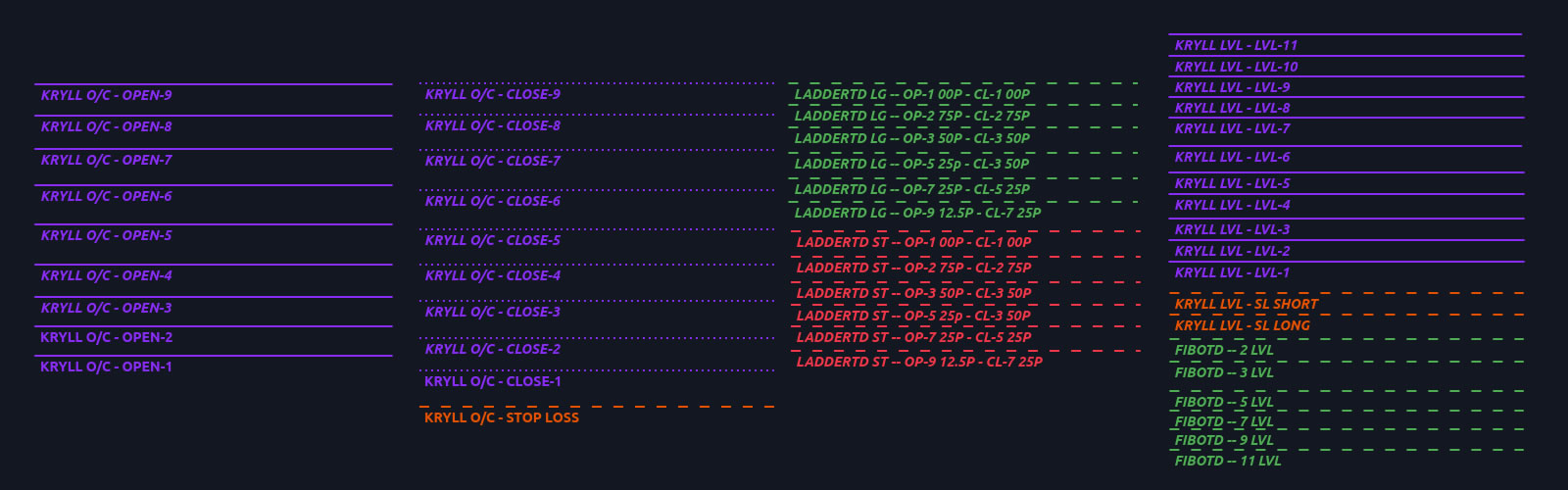
Desktop app
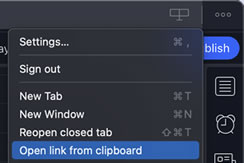
In the chart containing the template, go to Nov 22, 2023. In your desktop application, click on the 3 dots at the top left and choose open link in clipboard. It's now available in your Tradingview account in a well-organized object tree.
Web app
In the chart containing the template, go to Nov 22, 2023. In your desktop application, click on copy in the top left-hand corner and save the template. It is now available in your Tradingview account in a well-organized object tree.
Configure tradingview webhook
You need to configure the trend templates after importing them into Tradingview, mainly by associating webhook URLs with them. You have a limited number of alarms with Tradingview based on your plan, so you need to manage them. That's why you need to use a pair-specific naming system, so you can manage them by finding them via Tradingview's alarm management tool.
Webhook to start a kryll strategy
With this start-up system, you can pre-arrange complex positions on an unlimited number of pairs without paying any fees. You don't pay any fees until the price hits the start-up trend in Tradingview. This trend sends a signal to Kryll to start the strategy associated with that specific webhook. The same webhook can be used on an unlimited number of pairs. This webhook/strategy association must first be configured on the Kryll website, see above.
- Trigger: Only once to avoid unwanted launch of strategy
- Alert name: provided in the template, you can use your own.
- Message*: Amount allocated to the strategy, leverage, livetrading or livetest.
*MANDATORY

- Notify in app: Be notified when a strategy is launched
- Webhook URL*: the specific one defined in point 2.3 of this page
- Play sound: Be notified when a strategy is launched
*MANDATORY
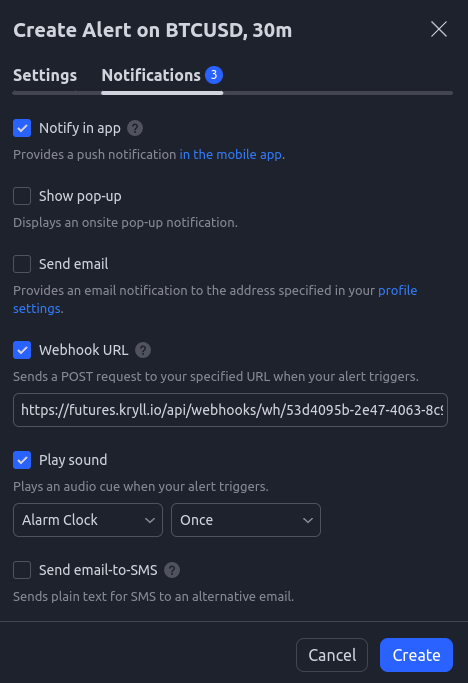
Webhook to send order signals
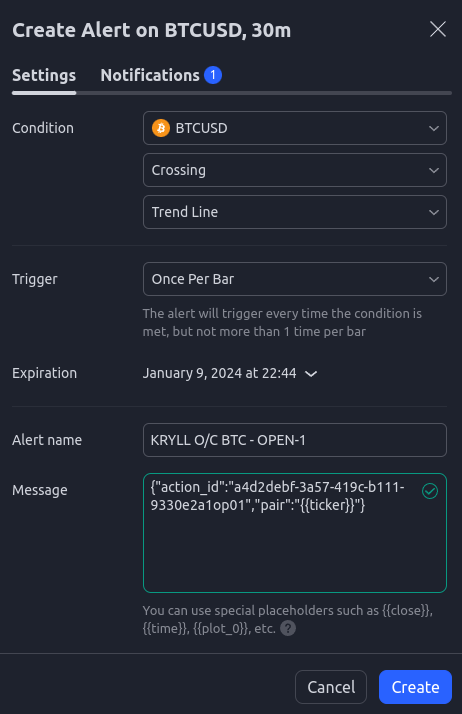
- Trigger: Once per bar to be shure the trigger occur in a fast moving market
Alert name: provided in the template, you can user your own.
- Message*: trigger a specific ID of a webhook block in a kryll strategy.
*MANDATORY
- Notify in app: disable to avoid unecessary nofitication
- Webhook URL*: target a specific type of strategy
- Play sound: disable to avoid unecessary nofitication
*MANDATORY

Start a strategy
The installation is done now, and you can trade directly in Tradingview without having to go anywhere else, pre-arranging complex positions on an unlimited number of pairs without paying any fees. All you have to do is place your trends according to your technical analysis. With Kryll, you can also trade in livetest mode, with lower fees and fake money.
More documentation in our dedicated page. Discover all our products.